
Short answer
A company registration certificate (certificate of incorporation) is issued by the Office of Company Registrar once registration is complete. Since the move to CAMIS it is digitally signed and carries a QR code, and it is downloaded from the OCR portal rather than collected on paper. It shows the company's name, registration number, date and type, and is needed for PAN, bank and licence applications.

| Issued by | कम्पनी रजिष्ट्रारको कार्यालय — the OCR |
|---|---|
| Format | Digital certificate with QR code, downloaded from CAMIS |
| Shows | Company name (English/Nepali), registration number, date, company type |
| Used for | PAN/VAT, ward registration, bank account, licences, tenders |
| Not the same as | PAN certificate (IRD) or industry registration (DOI) |
What the certificate shows
- The company's registered name in English and Nepali.
- The company registration number — the permanent identifier for the company at the OCR.
- The date of registration under the Companies Act 2063.
- The type of company (private limited, public limited or not distributing profit).
- The digital signature of the issuing authority and a QR code linking to the OCR record.
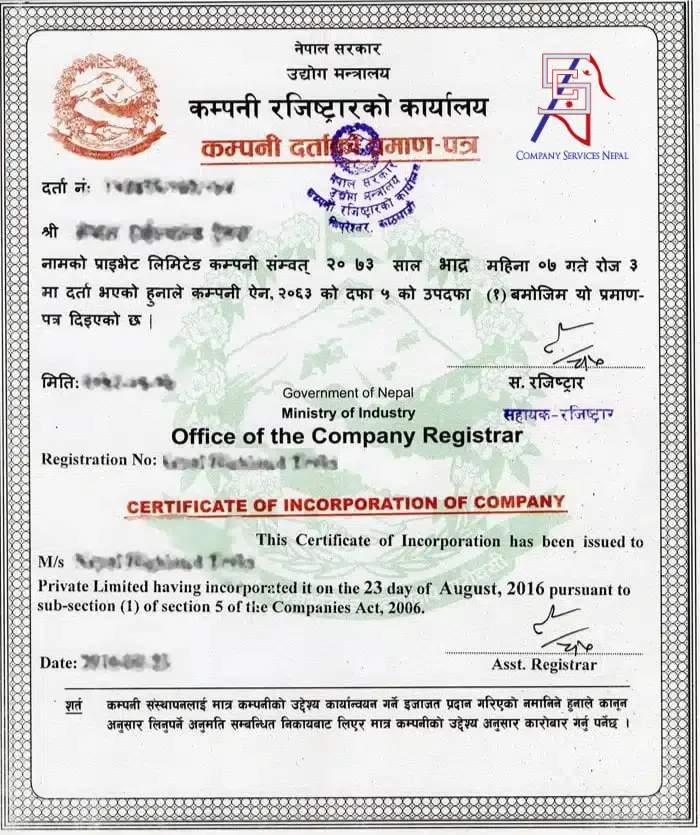
The certificate proves that the company exists. It does not show shareholders, directors or capital — those are in the MOA/AOA and the OCR records — and it is not an operating licence. A new company still needs its PAN and any industry or sector licences before trading.
How to download your company registration certificate
- 1
Log in to CAMIS
Sign in from ocr.gov.np with the account used for the registration. Our OCR login guide helps if you cannot get in.
- 2
Open the company's file
Go to the completed registration application for the company.
- 3
Download the certificate
After the fee has been paid and the registration approved, the certificate is available to download as a PDF.
- 4
Store it safely
Save the PDF with the approved MOA and AOA, and print copies for the office and bank.
How to verify a company registration certificate
Scan the QR code with a phone. It should open the OCR's record for the company, and the name, number and date must match the certificate exactly. If there is no QR code — common on certificates issued before CAMIS — search the registration number on the OCR site. Any mismatch is a reason to stop and investigate before signing a contract.
For a deeper check of who owns and runs a company, use the methods in our guide to company search and share lagat.
Certified copies and lost certificates
For a CAMIS-issued certificate, the simplest solution is to download it again from the portal. Where an authority asks for a certified copy — for example some embassies, foreign banks or courts — the company requests one from the OCR with the registration details and the applicable fee.
For older paper certificates, a lost original can be replaced by applying to the OCR with a board decision, a short explanation and the company's details. Many companies are also moving their records into CAMIS so documents can be retrieved online in future.
What the OCR sends you after registration
- The certificate of incorporation (कम्पनी दर्ताको प्रमाण-पत्र).
- One certified copy each of the approved Memorandum (प्रबन्धपत्र) and Articles (नियमावली).
- A covering letter (कम्पनी दर्ता भएको प्रमाणपत्र पठाइएको) listing the company's registration number, authorised, issued and paid-up capital and the conditions it must follow, copied to the Department of Industry, the cottage and small industry office, the IRD and Nepal Rastra Bank.
- A letter on the company's PAN — the OCR and IRD systems are linked, so the company is told its reserved Permanent Account Number and how to complete e-PAN registration with the IRD.
Conditions printed on the OCR registration letter
The letter that comes with the certificate lists conditions every new company must follow. In plain English, they are:
- 1
Capital is fixed as approved
Authorised, issued and committed paid-up capital are recorded exactly as stated in the letter.
- 2
File documents on time
Send the OCR every document the Companies Act requires, within the time limits.
- 3
Act within the law
Do nothing against the Companies Act or any other law.
- 4
Put up a Nepali signboard
Display the company's name in clear, large Nepali letters where everyone can see it.
- 5
Don't mislead anyone
The company must not be set up in a way that misleads or harms others.
- 6
Keep proper accounts
Maintain books of account as the Companies Act requires.
- 7
Amend MOA/AOA properly
Changes take effect only after they are recorded with the OCR (except where the law makes them automatic).
- 8
Report your address within 3 months
Notify the OCR of the company's address within three months of incorporation, or a fine applies — and register with the Inland Revenue Office for a PAN.
Key takeaways
- The OCR certificate proves incorporation; it is not a tax certificate or an operating licence.
- CAMIS certificates are digital, QR-coded and downloadable from the portal.
- Verify any certificate by scanning its QR code or searching the registration number.
- Certified copies and replacements are requested from the OCR.
Frequently asked questions
Is the digital company certificate legally valid?
Yes. Certificates issued through CAMIS are digitally signed by the OCR and can be verified through the QR code.
Does the company registration certificate expire?
No. It remains valid for as long as the company exists. What must be kept current is the company's annual filing with the OCR.
Can I download a certificate for another company?
No. You can verify another company through the OCR search or its QR code, but downloading certificates is limited to the company's own account.
Is a business registration certificate the same as a company certificate?
Not exactly. “Business registration certificate” is often used for firm or ward registration; the company certificate is the OCR's certificate of incorporation.
What should I do if the certificate has a spelling mistake?
Contact the OCR promptly with the supporting documents. Errors made by the applicant may require a formal amendment.
Sources and official references
Government fees and rules change with each Finance Act and OCR/IRD notice. We re-check the figures on this page regularly; confirm the latest amount with the office concerned or ask our team before you pay.